Wednesday, February 21, 2024

About that Groq demo

Recently the good folks at Groq released a formidable demo showing a 70 billion parameter language model inferencing at 300 tokens per second at batch size 1. This immediately elicited two responses from the community:

  1. Wow, this is so fast and the best thing ever
  2. This sucks because it has to run on an entire cluster
In fact, the truth is somewhere in between. Let's take a look.

Configuration. Groq's marketing is somewhat facetious here. The 'LPU' is just their old 14 nm SRAM-based systolic array processor, which is in turn somewhere in between the Graphcore SRAM-based processor array and the big systolic arrays found in Gaudi and TPU. The LPU has 230 Mbytes of SRAM per chip, and some software tricks are used to shard the model across many, many LPUs for inference. If we assume 10 Mbytes activation memory per token, 4K context on a 70B parameter model in int8 comes out to about 110 Gbytes of memory, which requires eight racks (512 devices) to hold. Needless to say, that is a rather voluminous configuration.

Power. At first glance Groq is absolutely boned here, requiring 512 300W devices (150KW) to do their inference. Fortunately, batch size 1 inference doesn't really stress the ALUs even with all of Groq's bandwidth (a forward pass is 140 Gflops so 300 tokens/sec is a tiny fraction of the total throughput of the cluster) so the actual power per chip will be quite low.

Economics. This is where it gets really spicy. Deriders will remark that the Groq device is $20K, but that's in quantity 1 from Mouser for a card built by Bittware, a company notorious for high markups. Groq's chip is fabbed on a '14 nm process' - give or take, the die probably costs $60, 2x that for packaging and testing. Now, here's the magic - because it is SRAM based, the boards are very simple; all in, I would estimate that a Groq board costs under $500 to build.

Suddenly, we're looking cost competitive. The boards for 512 devices come out to $250,000, figure double that once we account for the host servers. Half a million for 10x the performance of an octal A100 ($180,000) is suddenly pretty good. Of course, we're being facetious here, because an octal A100 costs about $50,000 to build, but Groq gets to pay wholesale prices and you don't.

Conclusions. What are our real conclusions here? I'd say there are two, maybe three:

  1. You have to cut the margins out. Nvidia systems are competitive at or near cost, but at their current ludicrous 10x margins you could design and tape out a custom chip for less than the cost of a medium sized cluster. Nvidia is responding to this - their 'cloud and custom' group will allow the sale of semi-custom SKUs to hyperscalers without compromising their annual reports too much, by breaking out the margin reduced parts into a different business unit.
  2. Old nodes are OK. Because inference is so bandwidth bound and memory controllers don't scale well any more, you can squeeze a lot of life out of old nodes. That's a big deal because that lets you second source your design, which puts pressure on the foundry to keep prices down. In contrast, pricing on leading edge TSMC nodes is utter chaos right now because capacity is completely booked.
  3. Engineering is silly. Groq took an ancient accelerator designed for high speed inference of ResNets, and through a monumental feat of system design and clever presentation was able to adapt it to achieve a world record in the hottest field in venture capital right now. In my eyes, that's pretty darn cool.

Saturday, January 6, 2024

How to buy an AI server on eBay

A Quick Primer

A neural network is, in essence, a stack of linear projections with some nonlinear functions interspersed in the stack. Merely stacking linear projections is boring, because the composition of two linear functions is another linear function, but it turns out that inserting even the simplest nonlinearity into the stack works some magic - the composite function "learns" locally linear regions of a complex nonlinear function because the interspersed nonlinearity changes the subspace it projects into. The important takeaway is that computationally, neural networks are a sequence of matrix-vector multiplies.

To train a neural network means to fit it to some set of known input value-function pairs. This is typically done through some variant of first order gradient descent on a loss function L which describes how well we've done the fitting. L and grad L are evaluated with respect to the neural network parameter weights; we typically approximate grad L by the gradient on some subset of the inputs (stochastic gradient descent). At each step the weights W are replaced by W' = W + gamma * grad L; the step size gamma is a key factor in convergence speed.

The widely accepted fastest-converging choice of gamma uses a heuristic called "AdamW", which looks at the first (time average) and second (time average of squares) moments of the gradient to compute gamma. AdamW stores the gradient, first moment, second moment, weight, and "fp16 copy of the weights" (matrix multiplier units typically work on fp16/bf16 inputs), a total of 18 bytes per parameter. This results in a large memory footprint during training - a 7B parameter network requires 126GB, a 34B parameter model 612GB, and 175B parameter model requires a whopping 3150GB. In practice this number is even higher - intermediate activations take up space, especially at large batch size.

Now obviously 3150GB of optimizer states aren't going to fit in a single node, and even 612GB is troublesome. In order to evade having to build ever higher capacity nodes (which is electrically hard), we instead partition the parameters, states, and inputs across nodes, do our computations as much as possible on each node, then synchronize the states across nodes by passing messages. This is nothing new - it's exactly how large scientific simulations on supercomputers work. The ML people have a name for this - sharding - and the scheme used to do the computations is called 'fully sharded data parallel'.

In order to reassemble the gradient, inter-GPU communication is required. Between nodes, this is done through a network which is assumed to be "slow", and painstaking steps are taken to mask the slowness. Internal to a node, the communications are assumed to be "fast", which is where the confusion begins: Nvidia enterprise GPUs can directly pass messages to each other, as well as to Nvidia-branded network controllers, if and only if all devices exist on the same PCI-e controller. If not, the sender has to first write to a CPU buffer, which is then read by the receiver.

Now, there's technically nothing wrong with this: PCI-e 3.0 is good for 128 gbits/sec, the intersocket connection is good for 300+ gbits/sec, and memory is good for many tbits/sec. The issue is all of this back and forth adds latency, and current frameworks generally make no effort to hide intra-node latency (in fact, they may exploit low intra-node latencies to optimize overall performance). This means we need to carefully arrange the GPUs and NICs to be on the same PCI-e controller in order to guarantee expected performance with existing libraries.

With that being said, let's take a look at some good and bad servers on eBay that are marketed as "good for machine learning":


Gigabyte G482

At first glance, this is looking pretty good. For about half of retail, you get a current-generation octal GPU system in 4U. It looks pretty well-engineered, and the vendor's website even says you can use it for AI!

However, this is not a good AI server. In this case, the vendor is as much to blame as the listing. Let's take a look at the block diagram:


As you can see, groups of four GPUs are connected to each socket. An unfortunate quirk of Epyc is each socket contains multiple PCI-e controllers, meaning at best, pairs of GPUs can directly communicate with each other. GPUs from the two hives of four have to cross the intersocket connection to send and receive data. Finally, it's also one slot short - the left CPU doesn't have a slot for a NIC.

This is a fine server for inference if the model fits on one or two GPUs, but then what are you doing running your high capacity inference at home? 🙃

Asus ESC4000's

These are old 2U HPC nodes which make no pretense to being good at AI (they're also not good miners, since you're spending hundreds of extra watts per node running the fans, chipset, and CPUs). Despite their humble origins and low price, these make solid inference servers for latency-sensitive applications - load them up with 4x A5000 and you'll be happily running two instances of llama-2-70B at 20 tokens/sec each. And trust me, quad GPU nodes are way easier to deal with than octal GPU nodes, which tend to be mechanically fragile and difficult to ship and power.

Supermicro SYS-4028


SYS-4028 was an extremely popular AI system in the era of smaller convolutional networks. However, the most common listings come with X9DRG-O-PCIE, which is an older-generation board designed for conventional HPC:
From the 40-lane-per-socket allocation, X9DRG-O-PCIE assigns two groups of 16 lanes each to two PLX switches, which each host two GPUs. So far so good, we get four GPUs able to communicate with each other via P2P. The remaining 8 lanes go to an x8 slot on the same root complex, which is enough for a FDR Infiniband card. That's a pretty robust setup for HPC, where some of the computations might need to happen on the host - hives of four GPUs can communicate over RDMA, and get 32 GB/sec back to the socket. Unfortunately, it's suboptimal for large scale machine learning, since the hives need to communicate over shared memory (and over QPI between the sockets, too!). Instead, what you want is this:

A rather insane layout, to be sure. All eight GPUs (128 lanes) oversubscribe 32 lanes back to one socket, with the remaining 8 lanes from that socket available for connectivity. You wouldn't dream of running your physics simulations on such a system, but the layout is optimal for machine learning: hives of 4 can DMA each other through the 96-lane switch, and the two hives can DMA each other through the root complex.

Happily, X10DRG-O-PCIE is available used for about $700. When all is said and done $1600 for what is the pinnacle of PCI-e based machine learning systems is not bad.

Tuesday, December 19, 2023

Sapphire Rapids for AI: a mini-review

 Intel often touts the performance of their 4th-generation Xeon Scalable "Sapphire Rapids" for generative AI applications, but there are surprisingly few meaningful benchmarks, even from Intel itself. The official Intel slides are as such:

Oof. Three ResNets, two DLRM's, and BERT-large. Come on guys, this is 2023 and no one is buying hardware to run ResNet50. Let's try benchmarking some real workloads instead.

Benchmarked Hardware

Xeon Platinum 8461V ($4,491) on Supermicro X13SEI, default power limits, 256 GB JEDEC DDR5-4800

Stable Diffusion 2.1

Everyone's favorite image generator. SD-2.1 runs on a $200 GPU, so perhaps it doesn't make sense to test performance on a $4,500 Xeon, but as Intel says, every server needs a CPU so the Xeon is in some sense, "free". We use an OpenVINO build of SD-2.1, which contains Intel-specific optimizations, but critically, is not quantized, distilled, or otherwise compressed - it should have comparable FLOPS to the vanilla SD models. Generation is at 512x512 for 20 steps.


Not too shabby. 6.27 it/s puts us somewhere around the ballpark of an RTX3060. On the other hand, you could run your inference on an A4000 (which is licensed for datacenter use) and get higher performance for just $1100, so the Xeon isn't exactly winning on price here.

llama.cpp inference


Inferencing your LLM on a CPU was a bad idea until last week. Microsoft's investments into OpenAI make it almost impossible to compete, price-wise, with gpt-3.5-turbo: since Microsoft is a cloud provider, OpenAI gets to pay deeply discounted rates over the 3-10x markup you would have to pay for cloud infrastructure. You can't escape by building your own datacenter either: without the high occupancy of a cloud datacenter, you still end up paying overhead for idle servers. This left 7B-sized models as the only meaningful ones to self-host, but 7B models are so small that you can run them on a $200 GPU, obviating the need for a huge CPU. (Obviously, there are security-related reasons to self-host, but by and large the bulk of LLM applications are not security-sensitive).

Fortunately for Intel, a medium-sized MoE model, Mixtral-8x7B, with good performance appeared last week. MoE's are unique in that they have the memory footprint of a large model, but the compute (really, bandwidth) requirements of a small model. That sounds like a perfect fit for CPUs, which have tons of memory but limited bandwidth.

It ends up being that llama.cpp, an open-source hobbyist implementation of LLMs on CPUs, is the fastest CPU implementation. At batch size 1 we get about 18 tokens per second in Q4, which is a perfectly usable result (prompt eval time is poor, but I think that's an MoE limitation in llama.cpp which should be fixed shortly?).

Falcon-7B LLM fine-tuning with TRL


This is probably the most interesting benchmark. Full fine-tuning of a 7B parameter LLM needs over 128 GB of memory, requiring the use of unobtanium 4x A100 or 4x A6000 cloud instances or putting $15K into specialized on-premises hardware that will be severely underutilized (given that you are unlikely to be fine-tuning all the time). The big Xeon is able to achieve over 200 tokens per second on this benchmark (with numactl -C 0-47 I was able to achieve about 240 tokens per second on this particular dataset at batch size 16).

It's worth noting that other 7B LLM's perform slower. I don't think this is because Falcon is architecturally different; rather, Falcon was a somewhat off-brand implementation using a bespoke implementation of FlashAttention.

200 tokens per second is pretty decent, allowing 3 epochs of fine tuning on a 10M token dataset in about a day and a half (for reference, openassistant-guanaco, a high quality subset of the guanaco dataset, is about 5M tokens, and a page of text is about 450 tokens).

Conclusions: usable vs useful?

First, without a doubt the three results presented above are usable. A single-socket Sapphire Rapids machine is able to generate images, run inference on a state of the art LLM, and fine-tune a 7B-parameter LLM on millions of tokens, all at speeds which are unlikely to have you tear your hair out. 

On the other hand, is it useful

In the datacenter, we could see a case for image generation, which runs briskly on the Xeon and has a light memory footprint. The problem is, the image generation workload uses all 48 cores for three seconds, which is a poor fit for oversubscribed virtualized environments. On a workstation, the thought of having 48 cores but no GPU is ludicrous, and even AMD GPUs are going to tie the Xeon in Stable Diffusion.

The LLM inferencing use case is a bit different, being primarily bound by bandwidth and memory capacity. The dynamics here are entirely enforced by market conditions, not raw performance or technology supremacy. For example, Sapphire Rapids CPUs are available as spot instances from hyperscalers; GPUs are not. Nvidia also chooses to charge $100 per GB of VRAM on its datacenter parts, but conversely, Intel seems to think its cores are worth $100 each even in bulk. Software support for the Xeon is poor - while llama.cpp is fast, it is primarily a single-user library and has minimal (no?) support for batched serving.

The training benchmark is the most interesting one of all, because it is an example of a workload that will not run at all on most GPU instances, and in fact, there are technology limitations as to why GPUs have trouble reaching 100s of gigabytes of memory. Once again, the Xeon is held back here by Intel's high pricing - a 1S Xeon system costs about $6,000, compared to about $15,000 for a 3x RTX A6000 machine which is significantly faster.

Finally, let's take a look at Intel's most important claim: "the CPU is free because you aren't allowed to not have one". Disregarding hyperscalers which work on a different cost model, a company upgrading to Sapphire Rapids in 2023 is likely still on Skylake. Going from a 20-core Skylake part to a 32-core Sapphire Rapids part represents a 2x boost in general application performance and a ~6x boost in AI performance, except for bandwidth-limited LLM inference where the gains are closer to 2x. Getting 2x more work done with your datacenter and a competitive option to run AI-based analytics or serve AI applications on top of that is a pretty compelling reason to buy a new server, and for a lot of IT departments that's all you need to make the sale.

Tuesday, April 18, 2023

Assorted video decoding tidbits

Some form of hardware acceleration is all-but-mandatory for playing 4K video, especially high bitrate H.265. Nowadays H.265 decoding is commonplace (you need to go all the way back to 2015 to find a CPU or GPU that can't decode HEVC Main10), but presumably as the world transitions to AV1 the same will apply.

Hardware accelerated decode in web browsers on Linux

It works! Well, sort of. On my test machine with an i3-12100F and an ancient Polaris 12 (AMD) GPU running the open source drivers, 1080p H.264 content is properly decoded by UVD but 4K60 VP9 (the famous '4K Costa Rica' demo clip on Youtube) is not. CPU usage seems a bit high in either case, about half a core in the former and 1-2 cores in the latter.

Decode on integrated graphics, display connected to discrete graphics

An esoteric use case. I ran into the H.265 version (!); I had a M4000 I wanted to use for Solidworks and the M4000 does not support HEVC decode, but the iGPU on the i5-12600 it was paired with does.

Unfortunately, this doesn't seem to work. iGPU usage remained zero and the M4000 ran in some sort of weird hybrid decoding mode. Performance, however, was acceptable.

Decode in integrated graphics, multiple GPUs and displays

Can we fix the above by plugging the monitor into the iGPU? The behavior is strange:


Both GPUs are now at 30% usage, but the CPU usage has gone through the roof. Very bad indeed, but possibly fixable with enough effort.

Remarkably, even in this bugged state the Costa Rica clip runs at 60 fps.

VLC + H.265, but the decoding is supposed to be done on the integrated graphics

Unfortunately, the iGPU chooses not to participate, but the hybrid decoding seems to work fine, playing back 4K24 high bitrate video with about 12% CPU usage. It's worth noting however that this is 12% of a 4.8GHz hex core Alder Lake, which is like..an entire laptop CPU from not that long ago or two whole 3GHz Skylake cores.

Heavy decode on integrated graphics

Surprisingly good. On my Kaby Lake laptop, the CPU is able to keep up with about 25% usage while remaining throttled to ~1.6 GHz on battery - the fixed function hardware really does the heavy lifting here and keeps the power consumption down.

Hardware accelerated decode, but there are many cores

The test system was a Epyc 7702 with an RTX 3060, by all means close to the state of the art. I didn't expect problems here, and didn't find any; the 3060 ran at heavy usage on the Costa Rica clip and the CPU was basically idle.

It's unclear what the actual CPU usage was; Task Manager lacks the granularity to deal with so many cores since even 1% is almost an entire core.

Tuesday, February 21, 2023

"Phones are getting better": buying a camera in 2023

It's a tough time to be a camera manufacturer. The mighty ISOCELL HP2 now rules the mobile space, sporting 200 million (!) 0.6um pixels binnable as 12.5M 2.4um pixels. Subelectron read noise, backside illumination, very deep wells, and sophisticated readout schemes allow virtually unlimited dynamic range while not compromising light sensitivity. Practically speaking, the out-of-the-box performance of a state-of-the-art mobile camera greatly exceeds that of any ILC in challenging-but-well-lit conditions: the phone has access to live gyro data for stack alignment, more processing than any ILC could dream of, and is backed by hundreds of millions of dollars of software R&D. It also has access to color science that, no doubt, has been statistically developed to be perceived as "good looking" across a wide demographic of viewers - I'm a firm believer that the best photos are the ones that make other people happy.

We can do some math to see just how screwed ILC's are. The Galaxy S23 Ultra ships with a 23mm f1.7 equivalent lens and a sensor measuring 9.83mm x 7.37mm, for a total sensor area of 72mm2. A full frame sensor measures 864mm2. Light gathering goes as the square of the f-number, so we have the following equivalency:
  • ISOCELL HP2 (1/1.3"): f1.7
  • 4/3": f2.9
  • APS-C: f3.9
  • Full frame: f5.9
At the wide end, ILC's are looking pretty dead: 24mm f5.6 is a reasonable aperture and focal length to shoot at on full frame, and the same performance can be achieved with with a phone. There's some argument that the FF sensor has higher native DR, but the phone has what is more or less a hardware implementation of multi-shot HDR which makes up for the difference. Plus the phone is, you know, a phone, and fits in your pocket.

Astute readers will note that 23mm is awful wide, and it's true - the effective sensor area of the phone decreases if you want a tighter focal length. Taking a look at a 2x crop (46mm equivalent), the sensor area of the phone drops to a rather shabby 18mm2, so the equivalency is now:
  • 4/3": 5.9
  • APS-C: f7.8
  • Full frame: f11.7
The ILC suddenly looks much more compelling - if you forced me to shoot at 45mm f11 all day I'd abandon photography and take up basket weaving.

This makes shopping a whole lot easier: phones obsolescing the moderate-wide-end means that zooms which include 50mm are are pretty useless. Suddenly, 50mm primes look real interesting again, especially since we are now spoiled for choice in the 50mm space. 4/3" cameras, which looked pretty dead for a while, also suddenly look viable: subjects you would shoot with a 50mm prime are often DOF-limited which means the larger sensors can't take advantage of faster apertures.

Things get trickier at longer focal lengths, because you are less likely to be DOF-limited. Wait, what?! Don't telephotos have a shallower depth of field? Well, it turns out for moderate focus distances, the DOF of a lens is proportional to the f-number, and inversely proportional to the square of the magnification. More likely than not, telephoto subjects are large, and since the sensor area is constant in a given camera the DOF actually increases if you stand far away enough to fit the subject on the sensor.

Telephotos provide a compelling argument to buy a full-frame body. Regardless of the sensor format telephotos are going to stay a constant size because they are dominated by their large front elements, and in the types of lighting you might want to use a telephoto lens you are often struggling for light. That premium 35-100/2.8 for 4/3" looks real nice until you remember it is the optical equivalent of a 70-200/5.6 on full frame, a lens so sad that they don't even make one.

Finally, there's image stabilization. I would argue that IS is mandatory for a good experience, especially for new users: for stationary subjects IS gives you something like three stops of improvement, allowing stabilized cameras and lenses to beat un-stabilized cameras with sensors ten times the size. The importance of that cannot be emphasized enough: that 18mm2 of cropped phone sensor can gather as much light as a 180mm2 (nearly 4/3 sized) sensor with an f1.7 lens on it factoring in IS. This unfortunately throws a wrench in many otherwise-sound budget combos: short primes didn't ship with IS until quite recently, and many budget bodies are un-stabilized.

With all that said, here are some buying suggestions:

The $500 "I'm poor" combo

The situation is dire. Long ago, I would have recommended an old 17-50mm f2.8 stabilized zoom from a third party and a used entry-level DSLR. Unfortunately, you'd be insane to tell a new user to buy an entry-level DSLR in 2023 (people expect features like "working live view" and "4K video") and the third-party zooms don't work with most mirrorless cameras. What we really want is a stabilized 40-50mm f2-2.8 equivalent (that's 40-50mm equivalent focal length, f2-2.8 real aperture) on a body that supports 4K video and PDAF, but inexplicably, that combination does not exist, even in the micro-4/3 world (which has had IBIS for a long time).

Consolation prize: any of the 24MP Nikon DSLR's, plus a Sigma 17-50/2.8 OS, used, but I wouldn't recommend it.

The $1000 combo

This used to be a downright reasonable price point, but inflation and feature creep have somewhat diluted it. Fortunately, the long-lived life cycles of Sony cameras help you here: a6500's are regularly available, used, for $600-700 leaving you with $300 for a lens. By some crazy miracle of third-party lenses you can fit two autofocus lenses into $300 - the Rokinon 35/2.8 is cheap and small, and the other can be 'to taste'.

The drawback here is that as a new system, long lenses for Sony tend to be rather inaccessible, but the same can be said of any other mirrorless-only system and the starter offerings for the Canon/Nikon ecosystem are very poor in comparison. It's also worth noting that there's nothing good at this price point new.

Recommendation: the most beat-up a6500 you can find, a used Rokinon 35/2.8, and one other lens, or save up and buy a second lens which costs more than $150 :)

The photographer's special: a D800, 50mm 1.8G, and 70-200 VR1. You lose a lot of features (stabilization, eye AF, 4K video, touchscreen) but optically the D800 is as good as they get, and the two lenses will let you take pictures none of your friends can. Highly recommended if you've spent some time behind a camera before - otherwise, the transition from phone to optical viewfinder may be a bit jarring.

The dubious alternative: an a7R ii and Rokinon 45/1.8. The a7R ii checks every box: stabilization, full frame, BSI, 4K video, but still manages to be a poor user experience nonetheless thanks to its ill-thought-out controls and menus. If you're fine with that, you get unsurpassable (as in, the sensor is limited by the laws of physics) optical performance for $1000.

The $1500 combo

Things start getting a little weird here. The a6500 is a really good camera, and its nice and compact too. The E-mount ecosystem matured quickly, with a ton of off-brand companies making decent prime lenses at ludicrously good prices. I would argue if you're content shooting short-to-moderate focal lengths, you are better off staying in the E-mount ecosystem - you can buy an a7iii and a nice starter prime for $1500, then (quickly) build out the system from there.

If you want to shoot long lenses, Sony no longer looks so sweet. The 70-200 options from the big three are comparable: the Sony GM Mark I is a native lens which is about $1500, the same price as the adaptable-without-penalties Nikon -FL but optically inferior. The EF-mount Mark III is the same price but worse than the FL (and better than the GM); the EF-mount Mark II is $500 less and probably superior to the Nikon VR2. The Nikon VR1 is incredibly cheap for a modern pro lens, but the corners are dubious which is a disaster for some people and a non-issue for others.

Above 200mm, Sony is out - the 200-600 is a very good budget 600mm option but pretty pathetic at 300 and 400mm. It's also very expensive: if you accept the extending barrel, the 150-600 options from third parties are $700 cheaper. Among Canon and Nikon, Nikon wins on the budget end (the Z6 was a very usable camera, the original EOS R was not), but Canon just announced some new releases so we should expect prices to move down across the stack.

Recommendation: a7iii plus your favorite primes (or a7R ii and your favorite primes if you don't shoot video at all)

Recommendation: Z6 Mark I, FTZ, 40mm f2, and 70-200 VR1. This comes out to $1800, and the VR1 recommendation is going to make a lot of people angry, but you'll be getting beautiful images for years to come (or until you drop the extra $1000 on the FL).

"I have money, help me spend it"

I'm a Nikon shooter so I'll just provide a Nikon kit. This assumes you have plenty of cash, but you aren't interesting in wasting it.

Body: Z6 Mark I. The Mark II is not worth the extra cash (unless you really need the second slot). Also, an FTZ to go with it.
Short lens: 40mm f2. There are so many options here and they're all good, so really, pick your poison.
Telephoto: Unfortunately, save up for the FL. It's not that much better than the VR2, but it fixes the focus breathing on the VR2 that was problematic at portrait focal lengths. The FL also performs exceptionally with teleconverters, so pick up a TC14 and TC20 III and get your 280mm f4 and 400mm f5.6 for "free".
Long lens: A sane man would recommend the 200-500 f5.6. I would also put a vote in for the 300/2.8 AF-S, which is only about $700 used and works well with teleconverters to get to 600mm. A madman would go all in and buy a 600/4 but seriously, don't do it - shooting with that lens is a serious commitment.
Ultrawide: Get fucked. You absolutely want a native ultrawide since the short flange distance on the Z bodies makes them much better, but Nikon refuses to provide a 16-35/2.8 which doesn't suck. I guess the 17-28/2.8 will have to do? The runner up would be the 14-30/4, but f4 isn't f2.8.

Sony will give you the same thing, trading the a better ultrawide for a worse long lens. Canon is...honestly superior, I think, but I am not familiar enough with Canon to make a $5000 recommendation.

Friday, September 16, 2022

The best little telescope that'll never get built

 I really love the IMX183 from Sony. For a very good price, you get 20 million BSI pixels with photon-counting levels of read noise and negligible dark current - truly a miracle of the economies of scale. The sensor is also large enough to have good light gathering capabilities, yet small enough to work with compact optics.

The problem is taking advantage of all 20 million of those pixels. 20 MP isn't that much - 5400-pixel horizontal resolution leaves you with precious little room to crop to 4K so actually resolving 20MP is important. You can't really buy a telescope that resolves 2.4um pixels - in the center anything diffraction limited will work, but if you want a fast, wide system getting good performance in the corners isn't happening. Obviously, the answer is to design your own telescope.

Now, I have zero interest in making telescopes - grinding your own lenses is ass and generally a poor use of time. If I wanted to spend time doing repetitive tasks I'd pick up embroidering or something. As such the system is designed to be reasonably manufacturable by an overseas vendor.


The telescope is a Houghton-type design with integrated field flattener, a focal length of 150mm, an entrance pupil of 76mm (3"), and a 6-degree field of view covering a 16mm sensor. The optical performance is pristine:


Normally, I would not vouch for a form like this - the telescope is much longer than its focal length, the image plane is inside the tube, and two full-aperture refractive elements are needed. However, in this case, we are building a small, tightly-integrated system: polishing a 3" lens is easy, the difference between a 6" and 10" OTA is negligible from a practical standpoint, and the IMX183 can easily be fit into the tube.

The glasses aren't great - the automatic glass substitution tool came up with BSM28 and BSM9 which are moderately costly, infrequently-melted glasses. The chemical properties are poor, basically akin to those of ED glass, but 77mm clear filters are cheap and readily available. The elements don't have any serious manufacturing red flags, though the curvatures are a bit steep compared to your usual refractor doublet.


Sunday, March 20, 2022

Image a DLP down through a microscope objective and look at it with a camera through the same objective


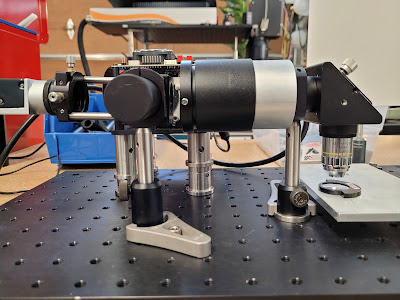
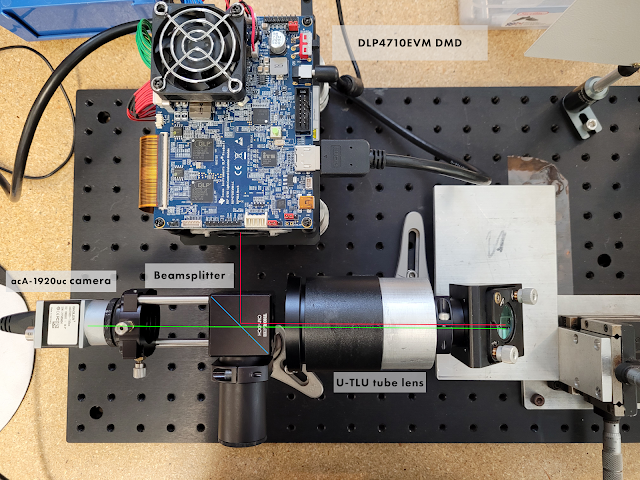
For some reason it's taken me a while to actually do this, but its easy to expose high resolution film or resist with a DLP. All you need is a camera, a beam splitter, a DLP, and some microscope parts.


The DLP is an ordinary DLP projector with the lens removed - I used a TI dev kit because the firmware offers nice features like "disable the LEDs" which can be used to, for example, replace the blue LED with a violet one for exposing resist. Unless you have a really exotic objective it is probably best to use a g-line (430nm) LED rather than a 405nm LED - the 430nm parts are hard to find but objectives will be quite dispersive in the far violet unless they are specifically designed to be apochromatic from violet to red. Your best bet is probably to leave the green LED in place for focusing and replace the blue LED with a violet one. A regular pico-projector will work just fine, but is less convenient to work with. You do save about $800 at current street prices though.

The light from the DLP reflects off a beam splitter and passes through the tube lens, which is just a 200mm a(po)chromat. A 200mm doublet would probably work fine here, but you can get better corner performance from a triplet or a quadruplet - the DLP is not very large though, so it might not matter.  The tube lens collimates the light and sends it down the microscope objective, which focuses it on the target.

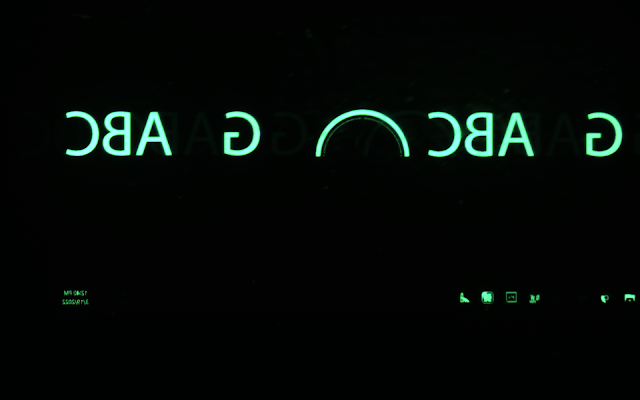
The camera looks down the other beam splitter path and sees the light scattered off the target. Unfortunately, this technique only works with optically smooth targets - otherwise, the camera sees the surface texture of the target and not the imaged patterns displayed on the DLP.


Parfocalizing the camera and the DLP is easier than it seems - the object side of the tube lens is something like f/50 so the depth of field is very large. Roughly speaking, there is only a small range of distances where the the objective comes into focus at all. Either by reading the datasheet or by trial and error it is possible to roughly set the backfocus, then the camera and target position are adjusted for best focus. Once a starting position is found, the backfocus can be adjusted to minimize spherical aberration (microscope objectives gain some spherical aberration if the conjugates aren't the right ones).

The pixel scale in the capture is 560nm/pixel, so the Windows clock is only a few microns long. Performance is as expected but it is always entertaining to use the Windows desktop on a 1mm wide screen :)

Sunday, January 30, 2022

The State of the CPU Market, early 2022

It's been a year of shakeups in the high-end CPU market, what with catastrophic supply chain shortages, the rise of AMD, and Pat Gelsinger's spearheading of Intel's return to competency. Now that the dust has mostly settled, it's interesting to look at what's hot, and what's not.

The 5950X is still king...

Alder Lake i9 really gives AMD a run for the money, but the 5950X is still the king of workstation CPUs, especially now that you can buy it. It has aggressive boost clocks which allow it to beat every Skylake and Cascade Lake Xeon Platinum (including the 28-core flagships), consistent internal design which scales well in every application, consistent and manageable 142W power limit, and bonus server features like ECC support. ADL is good, but the 250W PL2 really kills it for workstation use (a good 12900K build requires serious effort to get right), and because of the heterogeneous internal layout it fails to scale on some operating systems and in some applications.

Scaling is really important in this era of 16, 32, and 64-core processors; many applications completely fail to scale past 16 cores, and even those that do exhibit much less than linear returns. As a result, those 16 highly clocked cores punch above their weight when it comes to real-world results - a 4.x GHz Zen 3 core isn't actually twice as fast as a 2.8 GHz Skylake core, but 16 4.x GHz Zen 3 cores can still outperform 28 Skylake cores because the 12 extra cores are doing less work.

...Except when it's not

The elephant in the room, of course, is single-threaded performance. Alder Lake outruns Zen 3 by about 20%, which is an enormous leap in x86 performance. For all intents and purposes, ADL is an 8-core CPU with 8 bonus cores that you can't really rely on. If you commit to the 8-core life (which encompasses a lot of applications), Alder Lake suddenly looks a lot more enticing, because 8 Golden Cove cores are 20% faster than 8 Zen 3 cores.

Of course, part of the reason why ADL can do this is because Intel 10 ESF ("7 nm") is a high performance node designed to scale to aggressive clocks at high voltages, and TSMC N7 is a SoC node designed for lower clocks and voltages. The price you pay is that those 8 Golden Cove cores draw twice as much power as 8 Zen 3 cores to perform 20% more work, which isn't very good engineering.

In the end, Zen 3 and Alder Lake are mostly complementary products. If your workflow is interactive content creation, gaming, or design work, ADL is right for you. If you're building a machine mostly to handle long renders and simulations, the 5950X is the best processor under $2000 for the job.

What about HEDT?

HEDT is a curious thing. In the beginning, desktop and server parts were cut from the same silicon. Starting with Nehalem, Intel experimented with bifurcating their designs into laptop (Lynnfield) and server (Gulftown) variants with rather drastically differing designs - Lynnfield was a SoC with an on-die PCIe root complex offering 16 lanes, Gulftown was a traditional design with an off-package PCIe controller offering 48 lanes. The bifurcation makes sense - laptops rarely need more than 16 PCIe lanes, whereas servers need dozens, or even hundreds, of lanes for accelerators, storage, and networking.

The bifurcation really took off starting with Sandy Bridge; Intel aggressively marketed the 2600K, which was cut from the mobile silicon. Sandy Bridge-E, the server based variant, filled a niche, but the platform was expensive and to top it off, unlocked processors based on the full 8-core SB-EP die were never released.

Since then, HEDT has come and gone - it hit a real low during the Broadwell-EP era, but experienced a resurgence with Skylake-X, which competed against the dubious-and-not-really-recommendable Threadripper 1 and 2. Unfortunately, Ice Lake-SP gives off Broadwell-EP vibes - namely, the process it is built on does not have the frequency headroom required to make a compelling desktop platform. This leaves AMD relatively unchallenged in the high end space:
  • The 24-core 3960X is currently a dubious choice over the 5950X - supply is poor, power consumption is high, and performance is not that much better. If you need balanced performance with good PCIe it's not a bad choice, but there are cheaper (Skylake-X, used Skylake-SP) and faster (the other Threadrippers) offerings in the category.
  • The 32-core 3970X is a good processor for most applications. Thanks to the blessing (or curse) of multicore scaling, it comes within striking distance of the 3990X is most applications at half the price, while offering the full suite of Threadripper features.
  • The 64-core behemoth 3990X is...not a very good choice, mostly due to extreme pricing ("$1 per X") and really bad scaling. Fortunately, it wields a very competent implementation of turbo, so it is never slower than the 3970X.
  • Threadripper Pro ("Epyc-W") is everything you've ever wanted, but is expensive and platform options are limited.
There are also a few interesting choices in the server space, with the usual caveats (long POST times, no audio, no RGB):
  • Dual Rome or Milan 64-core processors offer unmatched multithreaded performance, but not much can take advantage of 256 threads.
  • Dual 32-core Epycs are an interesting choice, offering performance comparable to a 3990X but with four times the aggregate memory bandwidth for all your sparse matrix needs
  • Dual low-end Ice Lake (e.g. 5320, 6330)  offers AVX-512 support and high memory bandwidth at a price and performance comparable to those of a 3990X, but may be more available. Unfortunately, 2P ICL motherboards are rather expensive.
As far as used options go, Haswell-EP and older are finally ready to retire, unless you really need RDIMM support. A pair of 14-core Haswell processors performs worse than a 5950X at twice the power, with all the caveats of 2P platforms attached. Otherwise:
  • Dual Skylake-SP is an OK choice, simply because Skylake Xeons are entering liquidation and Epyc Rome is not. Technologically, Skylake has no redeeming features over Rome, but the fact that you can pick up a pair of 24-core Platinums for slightly more than $1000 is interesting. It's worth noting only the 2P configuration is interesting; 1P Xeon is generally slower than a 5950X.
  • Epyc Naples is bad. Don't do it. Threadripper 1 falls in the same category, the only times you'd consider either of these is if you found a motherboard in the trash or something.
Summary

"My application scales indefinitely with core count"

No, it doesn't. But for this class of trivially-parallelizable application (rendering, map/reduce, dense matrix), the 5950X is a safe bet. The most extreme cases can benefit from one of the high core count platforms (Threadripper, Epyc, Xeon Scalable), but careful to benchmark the applications first - the 5950X wields a considerable clock speed advantage over the enterprise platforms which often swings things in it favor.

"I only need 8 cores"

The 12700K is probably your friend here, it's strictly faster than the 5800X. This category encompasses most content creation and all of CAD (minus simulation).

"Give me PCIe or give me death!"

This encompasses all of machine learning, plus anything which streams data in and out of nonvolatile storage. The 3960X is perfect for you, but in case its out of stock (which it probably is), the winner is...the 10980XE, which is fast enough to feed your accelerators and generally available. Of course, die-hard accelerator enthusiasts are going to look to more exotic platforms, and there, the platform dictates the choice of CPU.

"I'm out of RAM"

If your application requires more than 256GB of memory, Epyc-W is the CPU for you. Unfortunately, it is rather expensive, so the second place prize, and the bang-for-the-buck prize, goes to a pair of used 24-core Xeon Scalable, which gets you pretty darn close to Epyc-W for $1200.

Tuesday, September 21, 2021

A Small Astrograph with a Large Payload


Building a large telescope is hard; designing a small telescope is hard. What exactly do I mean by that? Well, there are parts of the telescope that don't scale well with size, for example, the instrument payload, the filters, or the focusing actuators. More often than not, a design which works well on a 1m-class instrument fails to scale down to a 300mm-class instrument because the payload is incompatible with the mechanics, or is so large that it fills the clear aperture of the instrument.

A small telescope should also be...small. A good example of this is the remarkable unpopularity of equatorially-mounted Newtonians; a parabolic mirror with a 3-element corrector offers fast focal ratios and good performance, but an f/4 Newtonian is four times longer than it is wide, which gets unwieldy even for a 300mm diameter instrument.

The Argument for Cassegrain Focus

Prime focus instruments are popular as survey instruments in professional observatories. However, they fail to meet the needs of small instruments because of:

  • Excessive central obscuration. A 5-position, 2" filter wheel is about 200mm in diameter. In order to maintain a reasonable central obstruction, a 400mm clear aperture instrument is required which is marginally "small". Any larger-diameter instrumentation requires a 0.6m+ class instrument which is outside of the scope of many installations.
  • Unreasonable length. The fastest commercially available paraboloids are about f/3. Anything faster is special-order and very expensive. An f/3 prime focus system is actually longer than 3 times its diameter because of the equipment required to support the instrument payload.
  • Challenging focusing. For a very large system, actuating the instrument is the correct method for focusing because even the secondary mirror will be several tons. For a small system, reliably actuating 10+ kg of payload with no tilt or slip in a cost-effective fashion is rather unpleasant.
  • Too fast. A short prime focus system is necessarily very fast, complicating filter selection. A very fast system also performs poorly combined with scientific sensors with large pixels.
The commercially available prime focus instruments (Celestron RASA/Starizona Hyperstar, Hubble HNA, Sharpstar HNT) are designed for use with small, moderately-cooled CMOS cameras, possibly with a filter wheel in case of the Newtonian configurations. The RASA is wholly unsuited for narrowband imaging because a filter wheel would almost cover the entire aperture.

A Cassegrain system solves these issues by (1) allowing for moving-secondary focusing (2) roughly decoupling focal ratio from tube length and (3) moving the focal plane to be outside of the light path.

The 50% Central Obstruction

A 50% CO sounds bad, but by area the light loss is 25%, or less than half a stop. A 300mm nominal instrument with a 50% CO has the light gathering capacity of a 260mm system, which is pretty reasonable. The 50% CO also makes sizing the system an interesting exercise, because at some point the payload will be smaller than the secondary and prime focus makes sense again.

The Design

The Busack Medial Cassegrain is a really nice telescope that this design draws inspiration from, but it requires two full-aperture elements each with two polished sides that makes it ill-suited to mass production. Instead, we build the system as a Schmidt Corrector, an f/2 spherical mirror, and a 4E/3G integrated corrector. There's really nothing to it - by allowing the CO to grow and using the corrector to deal with the increasing aberrations, an f/4 SCT is entirely within the realm of possibility. There's a ton of freedom in the basic design, the present example makes the following tradeoffs:
  • f/4 overall system allowing for the use of an f/2 primary (which we know is cheaply manufacturable based on existing SCT's). f/4 also allows for the use of commodity narrowband filters.
  • 400mm overall tube length (not counting back focus) is a good balance between mechanical length and aberrations. 50mm between the corrector and secondary allows ample space for an internally-mounted focus actuator.
  • 160mm back focus allows for generous amounts of instrumentation including filters, tip-tilt correction, and even deformable mirrors.
  • Integrated Schmidt corrector allows for good performance with no optical compromises.
  • Corrector lenses are under 90mm in diameter and made from BK7 and SF11 glass, all easily fabricated using modern computer-controlled polishing.
The total length of the system could also be shortened, and the corrector diameters reduced, by increasing the primary-secondary separation and reducing the back focus, depending on instrument needs. Overall performance is quite good, achieving 4um spots sizes in the center and a high MTF across the field.


Actually Building It?!

Obviously, you are not going to make a 300mm Schmidt corrector and a four-element, 90mm correction assembly at home. This design is probably buildable via standard optical supply chains (the hardest part would be getting someone who is neither Celestron nor Meade to build Schmidt correctors). The correction assembly should also be further improved - there are a huge number of choices for its configuration and the 'correct' one is probably the one that is most manufacturing-friendly.

Shoot me an e-mail in case you are crazy and want to do something with the prescription for this design!

Friday, July 9, 2021

GCA 6100C Wafer Stepper Part 2: the stages

The modern wafer scanner is a truck-sized contraption full of magnets, springs, and slabs of granite capable of accelerating at several g's while maintaining single-digit nanometer positioning accuracy. The motion systems contained within painstakingly try to optimize for dynamic performance by using active vibration dampening, voice coils, linear motors, and air bearings, all to increase the value of the machine for its owner (who spent a good fraction of a billion dollars on it).

As it turns out, a 80's stepper is none of these things. Scanners are immensely complex because they are dynamic systems - as the wafer moves in one direction, the reticle moves in the other direction, perfectly synchronized but four times faster. In contrast, steppers are allowed time to settle between steps, which allows for much more leeway in the motion system design. Throughput requirements were also lower; compare the 35 6" wph of an old stepper to the 230 12" wph of a modern scanner.

Old stepper stages are an instructive exercise in the design of a basic precision motion system; in fact, Dr. Trumper used to give this exact stage out as a controls exercise in 2.171. The GCA stages are also particularly interesting from a hardware perspective - they are carefully designed to achieve 40nm positioning accuracy using fairly commodity parts. The only precision parts seem to be the slides for the coarse stage, and even those are ground, not scraped.

The stage architecture

System overview

GCA steppers use a stacked stage architecture. Coarse positioning is done by two conventional mechanical bearing stages stacked on top of each other. Fine positioning is done by a single two-axis flexure stage. Rotational positioning, which only happens for alignment, is done using a simple open-loop, limited travel stage mounted on the fine stage. Focusing, which is done by changing the Z spacing between the lens and the wafer, is done by moving the optical column up and down with a linkage mechanism.

The position feedback system


The fine position feedback on GCA steppers is implemented through a two-axis HP 5501A heterodyne interferometer. Briefly, a stabilized HeNe laser is Zeeman split through a powerful magnet to create two adjacent lines separated by a few MHz with different polarizations. One of these lines is separated with a polarizing beam splitter and reflected off a moving mirror; this line is Doppler shifted due to the velocity of the moving mirror and beat against the stationary component to generate a signal. This signal is compared against a stationary REF signal to derive velocity and position measurements. Heterodyne interferometers are the preferred choice for metrology due to their insensitivity to ambient effects and power fluctuations.

The 5501A is the de facto choice for interferometric metrology; its successor the 5517 is still available from Keysight. A description of the system as found in the GCA steppers is as follows:

The laser points towards the rear of the stepper; a 10707A beam bender and a 10701A 50% beam splitter generate the two axes of excitation. The X and Y stages have identical measurement assemblies; the Y assembly is located to the rear of the stepper (behind the column) and the X assembly is located inside the laser housing. Both assemblies use a plane-mirror interferometer which differentially measures the wafer position against the optical column; the stationary mirror is a corner cube mounted to the column and the moving mirror is a 6" long dielectric quartz block mirror mounted to the wafer stage. The flats are precision shimmed to ensure orthogonality (since it is the orthogonality of the flats which determines the closed-loop orthogonality of the motion).

There are two additional position sensors in the system. The first is a sensor to measure the position of the fine stage relative to the coarse stage. Literature indicates that this is an LVDT, but on the 6100C it appears to be implemented as two photodiodes outputting a sin/cos type signal. The second is a brushed tachometer on each of the coarse stage drive motors, which is used for loop closure by the stock controller.

The coarse stage

The purpose of the coarse stage is to position the fine stage to within 0.001" of its final position. The stage is built as a pair of stacked plain-bearing stages; these stages are driven by brushed DC motors with brushed tachometers for velocity feedback. The motors go through a right-angle gearbox comprising of a bevel gear and several spur gear stages before being coupled by a flexible coupling to a long drive shaft which turns a pinion positioned near the center of each stage. This pinion drives a brass rack mounted to the stage which generates the final motions.

The fine stage


The fine stage is constructed as a parallel two-axis flexure stage with a few hundred microns of travel on each axis. The flexures are constructed from discrete parts; the stage is made from cast iron and the flexures themselves are constructed from blue spring steel. Actuation is by moving-coil voice coil motors with samarium-cobalt magnets, and position is read directly from the interferometer system.

The theta stage


The theta stage is a limited travel stage based on a tangent arm design. A (very small) Faulhaber Minimotor is coupled into a high reduction gearbox, which drives a worm gear that turns a segment of a worm wheel. The worm wheel pushes on a linkage which rotates the wafer stage about a pivot point.

Rotation control is entirely open-loop - the wafer is rotated once during the alignment process based on the fiducials observed through the alignment microscopes. A slow open-loop system is acceptable given that the speed of rotational alignment does not significantly affect wafer throughput.

The Z mechanism

The focusing mechanism is a limited-travel (according to literature, about 600um) flexure mechanism. The entire optical column is suspended on two large spring steel plates; a stiff spring counterbalances the weight of the column. A voice coil motor (identical to the fine stage VCMs) actuates a linkage mechanism which moves the column up and down.

Adjusting the mechanism is a bit subtle. The white rod sticking out is actually a tensioning mechanism for the counterbalance; it is possible to aggressively tension the spring to stiffen the assembly for transport. The cap at the end of the rod can be removed to reveal a nut and a piece of threaded rod with a flathead in it. You want to hold the rod in place with a screwdriver and crank on the nut with a wrench until the column just barely 'floats' in place.

Incidentally, this mechanism also reveals a fairly severe weakness of the focusing system - it is extremely undamped. Any disturbances on the column cause the whole assembly to ring like a bell, with the only source of damping being the resistance of the VCM. I think (though there is some information to the contrary) that 6000-series GCA steppers focused once per wafer, relying on wafer leveling to keep the image in resist in focus between fields. Otherwise if the focusing had to be highly dynamic there could be problems.

Sunday, May 23, 2021

GCA 6100C Wafer Stepper Part 1: Intro and Maximus 1000 Light Source

The yellow lights make it look more legitimate

I have always wanted to expose a wafer. I'd written off making my own transistors long ago (nothing that fits in a house is good for feature sizes small enough for interesting logic, and I'm not a good enough analog engineer to design interesting analog), but there are many useful optical and mechanical parts that can be made lithographically.

The usual route to home lithography is a microscope and a DLP, but the resultant ~2mm field sizes are not sufficient for mechanical parts and stitching a 20mm field out of 2mm subfields is very taxing on your motion system. Contact aligners are simple and perform well, but getting submicron resolution for interesting optical parts out of a contact aligner is challenging (the masks also get quite expensive).

The natural solution is to start with a stepper lens (which is basically a giant microscope objective with very bad color correction). There are a few variants - 1:10 lenses with a 10x10mm field, 1:5 lenses with a 14x14mm field, and 1:4 lenses, which weigh several hundred kg and have a 20x20mm field. Stepper lenses also come in several colors: g-line (436nm), i-line (365nm), and DUV (~250nm).

I wound up with a 1:5 g-line lens; the 1:5 lenses strike a good balance between performance and unwieldiness. I also had a set of stages pulled from a DNA sequencer good for a couple microns of resolution. The rough plan was to stack a fine stage on top of these and use a direct-viewing technique to perform alignment. However, the project quickly went south when I realized building an exposure tool entailed buying the parts out of an...exposure tool. Conveniently, a circa 1985 GCA DSW 6100C showed up for more or less scrap value near me, so one rigging operation later I was the proud owner of a genuine submicron stepper.

The DSW family of steppers are true classics; GCA Mann practically invented the commercial stepper in the late 70's. The GCA steppers remained more or less unchanged until the company's demise; everything from the g-line DSW 4800 to the AutoStep 200 shared a stage design, alignment system, and mechanical construction (unfortunately, they also all shared a terrible 70's-grade electronics package!). A number of GCA tools still survive in university fabs, mostly converted to manual operation. Briefly, the design consists of:

  • A cast-iron base with a cast-iron 'bridge' holding the optical column.
  • A stacked stage consisting of two coarse mechanical bearing stages driven by servomotors, two fine flexure stages constructed as a single unit driven by voice coil actuators, and a open-loop, limited-travel rotation stage driven by DC motors.
  • Feedback provided by an HP 5500-series interferometer that meters the displacement between two mirrors mounted to the optical column and two flats mounted to the fine stage.
  • A reticle alignment stage consisting of a small flexure actuator and fine-pitch screws for adjustment.
  • A focusing system using a photoelectric height sensor and a linkage mechanism that adjusts the entire optical column height (!) with a travel range of around 1mm.
  • An alignment system using two fixed microscopes to align the origin and rotation of the wafer.
  • A high-pressure mercury arc lamp with a homogenizer and filter (MAXIMUS) to illuminate the reticle with Kohler illumination of the appropriate wavelength.
My copy showed up in an interesting state of disrepair - the laser and alignment microscopes were missing (why anyone would want the alignment microscopes is beyond me), and the Maximus made rattling noises. The first step was to repair the light source.

Inside the Maximus 1000

Life before LEDs was bad. Arc lamps produce a concentrated point of light a few mm across, and turning that into uniform illumination across a 4" reticle is challenging. Now, normal people use a elliptical collector, a condenser lens, and a fly's-eye homogenizer to produce uniform illumination, but not GCA.

Instead, the inside of the Maximus looks like this:


The arc lamp goes in the center; the four identical assemblies each collect 1/4 of the arc lamp output.


The top left is a condenser lens assembly. The diagonal mirror is a cold mirror (it dumps IR into a heatsink not shown); the round filter below it is a narrowband filter for the design wavelength (in this case, 365nm). So far, reasonable. But, where you would usually see a homogenizer after the filter, there is instead a focusing lens. This lens focuses the lamp output into four fiber lightguides, which bundle into a single lightguide on the other end. The output of this lightguide is then imaged onto the reticle in the usual fashion by a illumination lens. This arrangement, while very complex, has a neat benefit: the characteristics of the illumination are solely determined by the light guide. The NA of the fibers sets the illumination field size, and the diameter of the output bundle determines the NA of the illumination. The illumination is perfectly uniform, since every fiber perfectly illuminates the whole field; missing fibers will only result in a slight overall loss of intensity.


As luck would have it, practically every screw in the Maximus was loose, and the bulb was snapped in half. The rebuild took a couple hours, and was greatly improved by removing the head from the stepper - dealing with loose lenses is much easier when you are not six feet off the ground (if by some chance you are reading this and also servicing a GCA stepper, removing the Maximus is easy - just pull the four socket head screws at the base of the condenser, un-route the shutter cables and lamp cables, and the unit lifts right off).

I haven't had a chance to check performance yet, as the bulb needs replacement. The Maximus uses Ushio USH-350DP bulbs. Of critical note: the USH-350DP is a two-screw-terminal designed for aligners. The Maximus uses a screw-on "bullet" on one end to convert it to a plug-in type; if you are changing bulbs, don't throw out the plug! 

Additional GCA resources

  • Here is a collection of various official GCA manuals scraped off the internet, mostly from university sites. The information in the manuals is helpful for understanding how the system works. If you are intent on actually using the stock GCA controller, the manuals are pretty much mandatory, since the PDP-based software is not very user friendly.
  • Here are various pieces of documentation from third parties (once again, mostly academic fabs). Additionally, there are several good DSW guides:

Sunday, October 11, 2020

The K39 mini-ITX case


Intro: the tiny and elusive K39

The K39 is the worlds' smallest case with discrete GPU support. No one really knows where it came from; there are several K39 variants listed on Chinese shopping site Taobao. There's even one listed on Amazon, with Prime shipping to boot, but at $148 with no PSU, it's of questionable value.

K39 specifications

The K39 is an odd case; it throws away…every feature…to achieve its small size. It has no drive bays, no external ports, and of course no lighting. Instead, it relies on onboard storage and rear I/O ports (though it is worth noting there are obscure K39 variants with a single USB port and a single 3.5mm jack). However, it is incredibly small - at 3.9 to 4.5L depending on the variant, it is even smaller than the 5.0L NFC SkyReach 4 Mini. Like the S4 Mini, it is limited to short (180mm) video cards. It also supports standard flex-ATX PSUs, though there are many caveats...

The K39 power supply

While the K39 can mount generic flex-ATX PSUs, it is, for all intents and purposes, a case with a built-in PSU. The K39 PSUs are very cheap 80Plus Gold rated units, built from recycled server parts.


In order to make the PSU more compact, the stock cable harnesses are cut short and soldered into a modular breakout board. Innovatively, the PSU uses thin, high-temperature silicone wire, which is both flexible and capable of carrying high currents. Due to cable routing restrictions, the modular cables are more or less essential for operation.

While it is possible to buy a K39 with no power supply, there isn't really a reason to do so. The modular supplies cost much less than the competition, and are available up to 600W, which is much more than the case can dissipate.

The build


The actual computer inside this case is strange and sort of terrible. It uses a long-discontinued ASRock X99 board, a 120W 14-core Xeon, and an R9 Nano. The ASRock board has gained some sort of strange cult following and costs as much now as it did new (or maybe there are a ton of people who need 128GB on an ITX board?). The Xeons are very cheap, but not very fast, with any cost savings over a Ryzen 3000 CPU immediately nulled by high motherboard prices. The Nano was never very good, it performs somewhere between a 1060 6GB and a 1070, but is crippled by its 4GB of VRAM. A dubious perk is that it is almost the fastest short card supported by macOS; the AXRX 5700 ITX can only be imported from China for a huge amount of money.

However, the components serve their purpose as being a maximum challenge testbed for the build. The X99e-ITX/ac is a very hard board to build around, especially with a 47mm cooler restriction. My previous thin X99 build had an 83mm clearance which was still quite difficult to work with - it required a discontinued Cooler Master cooler, custom waterjet stainless brackets, and a machined-down 120mm fan. The Nano's TDP is also at the top end of short cards; the other contenders (the 1070, RX 5700, and 2070) have similar ratings.

Build notes


There's surprisingly little to say here. The K39 variants are all a little awkward to work with because they require a complete disassembly for component installation. On this flavor, the front panel comes off to reveal a freestanding motherboard tray. The I/O shield pops into the outer shell, then the tray with installed motherboard and riser slides in. The PSU and PSU cables go in next, followed by wiring, the GPU, and finally the front panel. This is where the super-flexible PSU cables come in handy; it would be impossible to route normal cables in the case.

The standard PSUs actually have a SATA power connector on them, but there is no room in the case for a 2.5" drive. My understanding is that folks who have 2.5" drives in the case use foam tape to affix them to one of the side panels.

Cooling

I was targeting a laptop-like acoustic profile on this build; that is, quiet when idle and loud and hot under load. I had originally wanted to use a 1U Dynatron vapor chamber active cooler. Unfortunately, the Dynatron was more or less unusable; it ran extremely hot (60C! at idle) and was amazingly loud. Even with a 50mV undervolt and a custom fan curve that ran minimum speed until 75C, the blower would randomly spool up with even one core active.

It was clear that some more "engineering" was needed. Fortunately, 47mm just barely clears a 1U passive cooler (29mm) with a 15mm thick fan stacked on top. To find a fan, I took to the trusty old technique of disassembling stock coolers; stock coolers are often laughed at, but to get sufficient cooling performance out of a small, cheap heatsink requires a serious fan. I ended up using a 70mm, 8.4W fan out of an FM2+ stock cooler:


The fan required a bit of minor machining (it had mounting feet that put it over the height limit). Some brackets were drawn up and printed…


…and the whole thing was put together with some screws and 3M VHB tape.


The small 40mm fan is critical; without it, the CPU would cook the SSD enough to severely throttle, meaning a lengthy cooldown period was necessary after heavy loads. It also cools the PCH by about 15C, which is not too bad for such an anemic fan.


The cooler bolts into place neatly, and the VHB seems to handle the high temperatures just fine.

Performance

We'll start with the bad news: the 2683 v3 is no longer fast. It does score a healthy 180 fps on KeyShot, but that's merely the performance of a 9900K, a CPU with six fewer cores. On the other hand, it does perform like a $350 CPU for $120, so if rendering is all you do it's not a bad choice.

There are a couple ways to tweak performance. An X99 + Xeon specific is to undervolt the CPU by 50mV. Furthermore, most boards allow custom-tweaked fan curves:


This is pretty necessary with a small, noisy fan; most boards idle too high by default. With a tweaked fan curve and small undervolt, the CPU idles at a slightly-warm-but-not-concerning 50C:


And a fairly nominal 66W:


Load is much more interesting. Most boards have some manner of power tuning available. On this particular board, the electrical design current (EDC) was settable, but unfortunately, the limit did not seem to correspond to actual amps. Thankfully, it was monotonic...setting an EDC of 80 resulted in a load power consumption of about 180W:


Delta-over-idle of 114W corresponded to an all-core speed of 2.3GHz and a load temperature of 78C.


Importantly, neither the SSD nor the DIMMs overheated, though the memory does get quite warm:


Removing the current limit results in 200W even of power consumption, representing a 134W delta-over-idle.

At this point, the fans get really loud, but temperatures are still in control:


The RAM is now looking uncomfortably hot - some heatspreaders might be warranted...


Conclusion

We learned today that it is possible to dissipate 135W with a 47mm cooler. We also learned the importance of ambient airflow - the 40mm fan doesn't move much air, but was absolutely critical for success. In addition, we learned that Haswell Xeons have underwhelming performance in 2020, though for the price they are pretty solid. Fortunately, a lot of this is still applicable to the upcoming Ryzen 5000 CPUs; 135W is perfect for getting stock performance out of a 105W Ryzen 5000. True masochists might also consider the EPC621D4I; with careful tuning, a 28-core Xeon Platinum may be possible.